Cybersecurity for Mumbai Businesses: What a Small Business Actually Needs in 2026
By Ayush DubeyNovember 24, 202616 min read
Short answer: Most Mumbai small businesses do not need an expensive security department, just five basics done properly: patching, endpoint protection, strong passwords with two-factor sign-in, a backup that has actually been restored in a test, and staff who can spot a fake invoice. A one-off audit or VAPT finds the gaps; a monthly managed service keeps watch after that. Costs run from a few thousand rupees a month for the basics to roughly Rs 15,000-30,000 a month for managed security for a team under 25. Ranges, not quotes.
On a Tuesday afternoon in a trading office near Masjid Bunder, the accounts manager opens an email that looks exactly like a supplier invoice, down to the logo and the GST number. She clicks the attachment to check the amount. By the next morning the office computers are locked, the customer database is encrypted, and a message on the screen demands payment in cryptocurrency. That is how cybersecurity for Mumbai businesses usually fails: not with a break-in through a firewall, but with one ordinary click on one ordinary-looking email.
Small businesses are the easy target, and attackers know it. A clinic in Borivali, a CA firm in Dadar, a jeweller in Zaveri Bazaar, a coaching institute in Andheri: all hold the same things attackers want, customer details, payment details, supplier bank accounts, a website customers trust, and most have no IT person and no plan for the morning something goes wrong.
This guide covers the three attacks that actually hit Mumbai small businesses, the five basics in order, when an audit or VAPT is enough and when you need a monthly managed service, what DPDP means for your business, what it costs, and the checklist before you sign. If you are choosing an IT partner for your office in general, read our guide to choosing an IT partner in Mumbai.
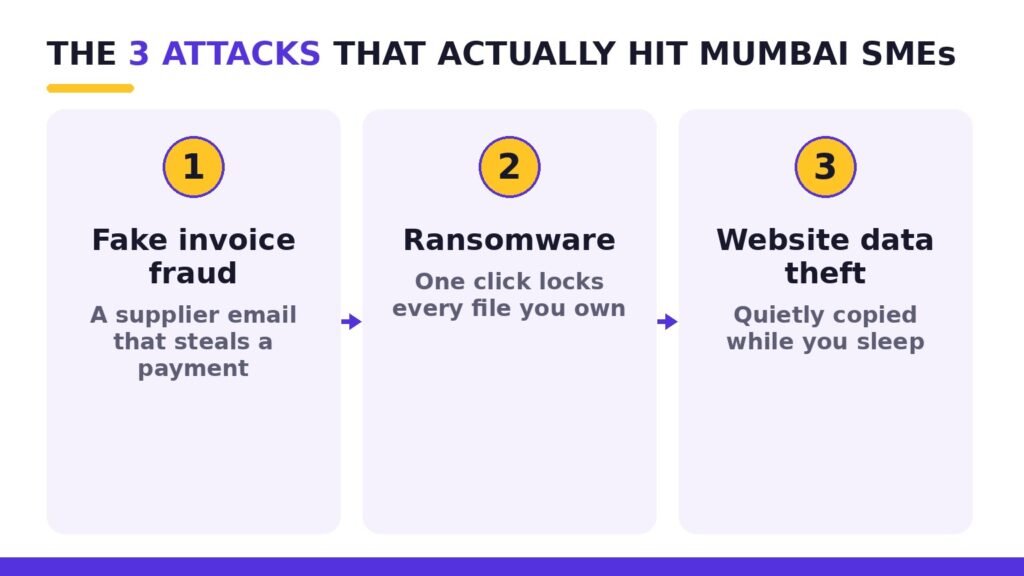
What are the 3 attacks that actually hit Mumbai small businesses?
The attacks that land on real Mumbai businesses are cheap, repeatable, and aimed at people, not at firewalls.
1. The fake invoice and payment fraud. An email arrives that looks like it came from a supplier, a customer, or even your own boss, carrying an invoice, a payment request, or a changed bank account number. The logo, the tone and the amount all look right. Someone in accounts pays it, and the money goes to a stranger. The defence: a second check on any new bank account, by phone, on a number you already have, before the first payment goes out.
2. Ransomware through email or remote access. Ransomware locks every file on a computer or a server and demands payment to unlock it. It usually arrives as an email attachment, or through a remote-access login left open to the internet with a weak password. Many offices set up remote access years ago and never turned it off. Once inside, it spreads to every shared folder and connected computer, including the backup drive if it is still plugged in. The defence is a tested backup kept offline, and remote access protected by two-factor sign-in.
3. Website defacement and data theft. Your website is changed overnight: the homepage shows a stranger’s message, visitors are redirected to a scam page, or the enquiry form starts sending details somewhere else. Sometimes the site is quietly copied instead, and customer details are taken from the database and sold. The owner usually finds out from a customer. Website care and security belong together: a site that is never updated is an easy target, and our guide to website maintenance in Mumbai covers the upkeep side of it. The defence is tested updates, a strong admin password with two-factor sign-in, and a daily scan that notices a changed file.
All three succeed because of a small gap that nobody checked, not because the attacker was brilliant. Small gaps are cheap to close.
What does cybersecurity for Mumbai businesses actually cover?
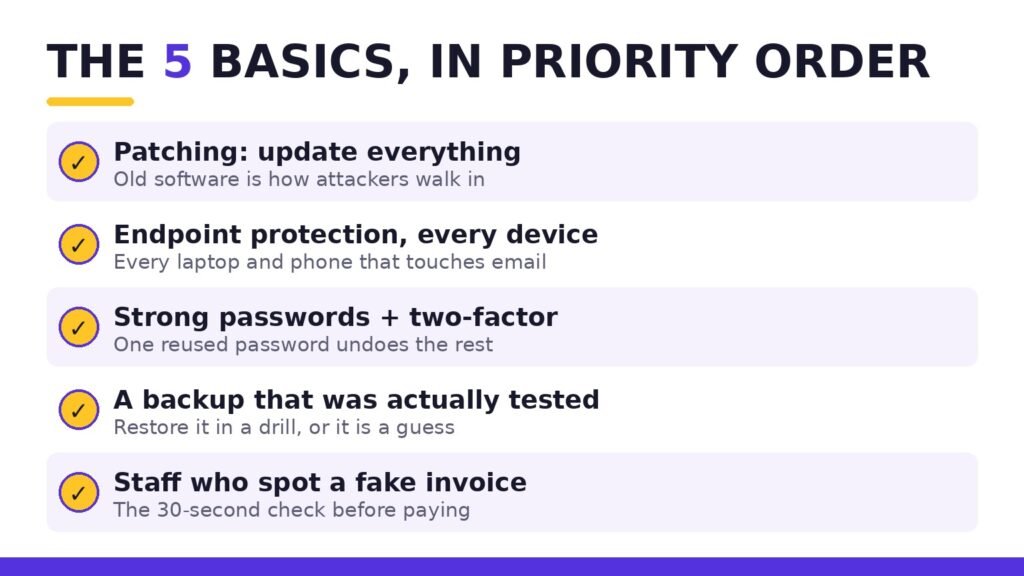
Five basics, in priority order. Do them in this order.
1. Patching: update everything, on a schedule. Patching means installing the updates for your computers, your phones, your website and the software you use every day. Attackers use known holes in old software, and the fix for most of them already exists as a free update. “Done” looks like this: every office computer updates automatically, and the website is updated on a tested copy first. If you already have someone looking after your office computers, this is part of managed IT support in Mumbai.
2. Endpoint protection on every device. Endpoint protection is the security software on each computer and phone, the modern version of antivirus. It watches for malicious files, blocks known bad websites, and flags strange behaviour. “Done” looks like this: every office computer and every phone that touches business email has it installed, it updates itself, and someone checks the alerts every week.
3. Strong passwords and two-factor sign-in. A password that is a name, a birth year or “company123” is not a password, it is an invitation. Every account that matters should have its own long password, stored in a password manager. Two-factor sign-in means that even if someone steals the password, they still need a code from your phone to get in. “Done” looks like this: two-factor sign-in switched on for email, banking and the website admin, and ex-employees’ access removed on their last day.
4. A backup that has actually been restored in a test. A backup is a copy of your files kept somewhere separate from your office computers, and at least one copy must be offline, so ransomware cannot reach it. But a backup you have never restored is a hope, not a backup. “Done” looks like this: files back up every day, one copy sits offline, and once a month someone restores a few files to prove it works, and writes down the result.
5. Staff training that uses real examples. Your staff are the target, so they are also the defence. Training does not mean a long lecture once a year: it means short, regular reminders using real examples of fake invoices and suspicious links. “Done” looks like this: a short session every quarter, a test phishing email every few months, and a rule everyone knows: if you clicked something odd, report it immediately, no blame. For more on training staff with automated reminders, see our guide to business automation in Mumbai.
Do the five basics first, in this order, before buying anything fancier.
Audit vs VAPT vs managed security: which one do you need?
These three are sold as if they were the same thing. They are not. Each answers a different question.
Option
What it finds
How often
Who it suits
Security audit
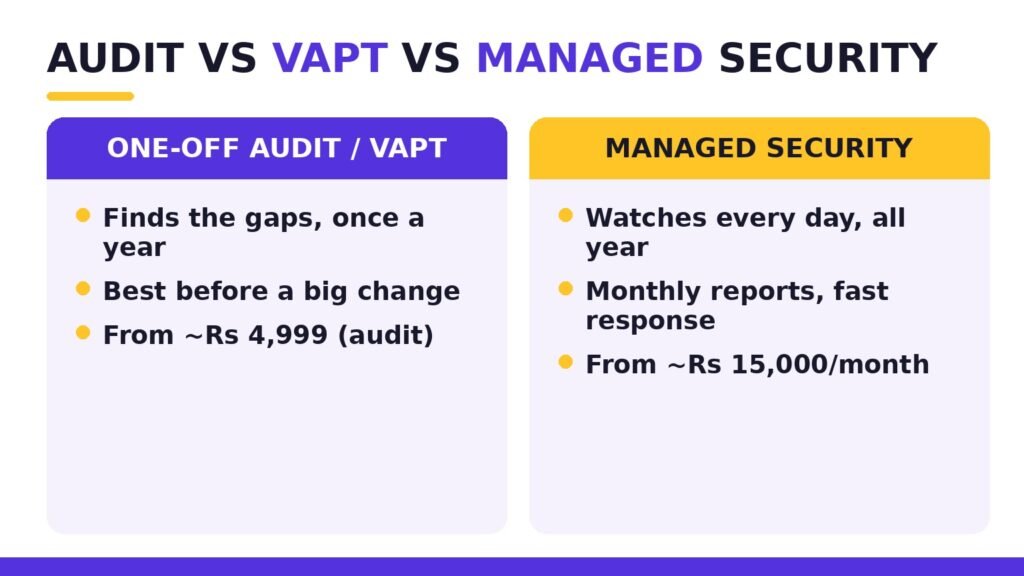
Gaps in your setup: missing updates, weak passwords, who has access, whether backups work
Once a year
A small business that wants a clear list of what to fix
VAPT
Real holes an attacker could use: a tester tries to break in, the way an attacker would
Once a year, or after a big change
A business whose website takes payments or customer data, or a client who asks for a test report
Managed security
Ongoing watch: monitoring, alerts, patching and response, every day
Monthly, continuous
A business with 25 or more staff, or no one in-house to watch the alerts
An audit tells you what is wrong. A VAPT proves it by trying to exploit it. Managed security watches for it every day after that. For most small businesses, the sensible sequence is an audit first, fix what it finds, then a VAPT if you take payments or hold customer data, and a managed service only when nobody in-house can watch the alerts. Buying a monthly managed service before the basics are in place is paying someone to watch a door that is standing open. If you run your own software or a customer portal, the VAPT matters more, because your code is your risk. Our guide to custom software development in Mumbai covers how secure development fits into a build.
How much does cybersecurity cost for a small business in Mumbai?
All costs below are published market ranges, not quotes. Ranges, not quotes. Add 18% GST to agency and managed-service fees.
Service
Published market range
CATEYE SMB Secure bundle (25 assets, 25 endpoints, one VAPT a year)
~Rs 17,999/month
CATEYE attack-surface scanning
From ~Rs 4,999/month
CATEYE monitoring (10 endpoints)
From ~Rs 4,990/month
CATEYE 24×7 monitoring
From ~Rs 9,990/month
CATEYE web-app VAPT (one-time)
From ~Rs 35,000
CATEYE network VAPT (one-time)
From ~Rs 75,000
Nithura free external check
Rs 0
Nithura security health check
~Rs 1,499
Nithura startup audit
~Rs 4,999
Nithura business audit
~Rs 9,999
Nithura web or API VAPT (one-time)
From ~Rs 24,999
Nithura complete business VAPT (one-time)
From ~Rs 49,999
Nithura cloud assessment (one-time)
From ~Rs 19,999
OneWebSphere vulnerability scan, SME website
~Rs 8,000-25,000
OneWebSphere website penetration test
~Rs 50,000-1,50,000
OneWebSphere annual security retainer, SME
~Rs 15,000/month
Managed security, team under 25 staff
~Rs 15,000-30,000/month
Managed security, team around 50 staff
~Rs 30,000-80,000/month
Managed security, 100-250 staff with 24×7 monitoring
~Rs 80,000-2,00,000/month
Endpoint licences
~Rs 1,200-5,800 per endpoint per year
The CATEYE figures come from CATEYE’s published pricing, and the managed-security bands come from ITforSME’s managed security cost guide. Nithura and OneWebSphere publish their own price lists. Treat every figure as a market range to compare against, not a quote for your business.
The five basics themselves are cheap. Password managers and two-factor sign-in cost little or nothing. Endpoint protection is roughly Rs 1,200-5,800 per computer per year. A first audit runs roughly Rs 4,999-9,999. A website VAPT runs roughly Rs 24,999-50,000 one-time. The expensive line is the monthly managed service, and that is the line to buy last.
OneWebSphere cites published industry figures putting the cost of a breach for an Indian small or mid-sized business at roughly Rs 45 lakh to Rs 4.5 crore, a published industry figure, not a Digital Dhatu claim. What pushes you up the range is predictable: more staff, more devices, a website that takes payments, and 24×7 cover. Get the extras in writing before you sign, with rates.
What is DPDP, and what does it mean for your business?
DPDP is the Digital Personal Data Protection Act, India’s data protection law. In plain words: if your business collects personal data from customers, you are responsible for keeping it safe, using it only for the purpose you collected it for, and telling the authorities and the people affected if it is breached.
Does it apply to your business? If you hold customer names, phone numbers, email addresses, addresses, payment details, health records, or employee data, yes. That covers almost every Mumbai small business.
What it means in practice is four things. Know what data you hold. Make a simple list: what you collect, where it is stored, and who can see it. Collect only what you need. If you do not need a customer’s date of birth, do not ask for it. Protect it with the five basics. The law does not name specific tools, but it does expect reasonable safeguards. Have a plan for a breach. If customer data is leaked or stolen, DPDP expects the business to report it, so you need to know quickly what was taken and who was affected, and one person who decides what happens next.
DPDP is not a reason to panic, and it is not a reason to buy an expensive compliance package on day one. It is a reason to do the five basics properly and to know what data you hold.
The 7-point checklist before you sign anything
Run through this list before you sign anything.
The five basics first: patching, endpoint protection, strong passwords with two-factor sign-in, a tested backup, and staff training.
A named person on your side: one person who owns security, reads the monthly report, and acts when something happens at 3 am.
Response time in writing: how fast does the provider start when something happens, split by priority?
What is included and what is extra: endpoint licences, the VAPT, incident response after an attack. Get the extras in writing, with rates.
Who holds the keys: your accounts, your data, your backups. You hold them, in your name, and the provider hands everything over if you leave.
A report you can read: a short monthly report showing updates applied, backup tests passed, alerts dealt with, and phishing-test results. Ask to see a sample before you sign.
A short term first: three months, then a year. Never a three-year lock-in on day one.
How do you know it is working?
Ask for a short monthly report, and read it every month. It should show five things: patches applied and what is still waiting; whether the backup restore test passed, and when; what alerts were flagged and what was done about them; how many staff clicked the phishing test, and whether the number is falling; and who joined, who left, and whose access was removed.
The first results usually arrive in the first month: the report, the backup test, and a team that starts pausing before it clicks.
The honest test is three questions: can we restore a file from last week’s backup, right now? Does everyone who left this year still have access? And does one person in this office know exactly what to do if a ransom message appears tomorrow morning? If the answer to all three is yes, you are in better shape than most businesses your size.
Frequently asked questions
What is the first cybersecurity step for a small business in Mumbai?
Start with the five basics, in order: patching, endpoint protection, strong passwords with two-factor sign-in, a tested backup, and staff training. Patching and two-factor sign-in cost little or nothing and stop the most common attacks. Then get a one-off security audit, roughly Rs 4,999-9,999 in published market ranges, to find the gaps you cannot see yourself.
How much does cybersecurity cost for a small business?
The five basics are cheap: endpoint protection runs roughly Rs 1,200-5,800 per computer per year, and password managers and two-factor sign-in cost little or nothing. A first audit runs roughly Rs 4,999-9,999, and a website VAPT runs roughly Rs 24,999-50,000 one-time, in published market ranges. A managed security service runs roughly Rs 15,000-30,000 a month for a team under 25 staff. Ranges, not quotes; add 18% GST.
What is a VAPT and do I need one?
A VAPT is a vulnerability assessment and penetration test: a security tester actively tries to break into your website, app or network, the way a real attacker would, and then reports the holes they found. You need one if your website takes payments or customer data, if you run your own software or customer portal, or if a client or partner asks for a test report.
What is DPDP and does it apply to my business?
DPDP is the Digital Personal Data Protection Act, India’s data protection law. It applies to almost every business that holds customer data: names, phone numbers, email addresses, addresses, payment details, or employee records. In practice it means knowing what data you hold, collecting only what you need, protecting it with reasonable safeguards like the five basics, and having a plan to report a breach.
What happens if we get ransomware?
Stop using the affected computers immediately and disconnect them from the network so the ransomware cannot spread. Do not pay the ransom: payment does not guarantee your files back, and it marks you as a business that pays. Call your IT support or security provider, and restore your files from the offline backup after the computers are cleaned.
How do I know our backup actually works?
Test it. Once a month, pick a random file from last week’s backup, restore it to a separate folder, and check that it opens and the contents are correct. Write down the date and the result. Once a quarter, check that a whole system could be rebuilt from the backup. If the restore takes hours, or nobody knows where the backup is stored, your backup is not a backup yet.
Talk to Digital Dhatu before the next fake invoice lands
The most expensive security bill is not the monthly fee for the five basics. It is the morning your screens are locked, your customer data is encrypted, and your staff are standing around a dead office wondering who to call.
Digital Dhatu helps Mumbai businesses put the five basics in place, get an honest audit of what is actually at risk, and set up the monthly reporting that proves it is working. We work from our offices in Vashi and Andheri West.
Book a free consultation and bring your current setup, or just a list of what worries you most. Contact Digital Dhatu today.
Share:
Want results like these for your business?
Talk to our team for a free consultation, with no obligation.
Short answer: Start with trust, then make the visit easy: real photos and videos of your pieces, a complete showroom listing with your address and hours,…
Short answer: Start with the admissions funnel, not the ads: a Google Business Profile and a simple page parents can trust, WhatsApp counselling that answers in…
Short answer: Website maintenance in Mumbai usually costs Rs 1,500 to Rs 6,000 a month for most business sites, depending on size and whether you sell…