GST Billing Software for Mumbai Businesses: Pick One That Gets You Paid, Not Just Billed
By Ayush DubeyNovember 20, 202615 min read
Short answer: Pick billing software that raises a correct GST invoice in under a minute, keeps billing when the internet drops, and chases payment for you with a UPI link and reminders. For most Mumbai shops, a cloud tool at around Rs 6,000 to 12,000 a year is enough. Traders with heavy stock usually need a desktop tool like Tally, Busy, Marg or Logic ERP. The software prepares your GST reports. Filing stays with you and your CA.
On a busy morning in Crawford Market, a wholesale cloth trader writes out his tenth bill of the day by hand, copies the same customer details for the third time, and realises at 6 pm that three buyers from last week still have not paid, because nobody reminded them. He is not losing money on price. He is losing it on billing. That is the exact problem good billing software in Mumbai is meant to solve: the bill goes out correctly, the stock moves with it, and the payment gets chased without you remembering to chase it.
What a GST invoice actually has to include
A GST invoice is not a fancy receipt. It has a fixed list of details, and if any of them are wrong, your customer cannot claim input tax credit, and your CA will send the bill back to you.
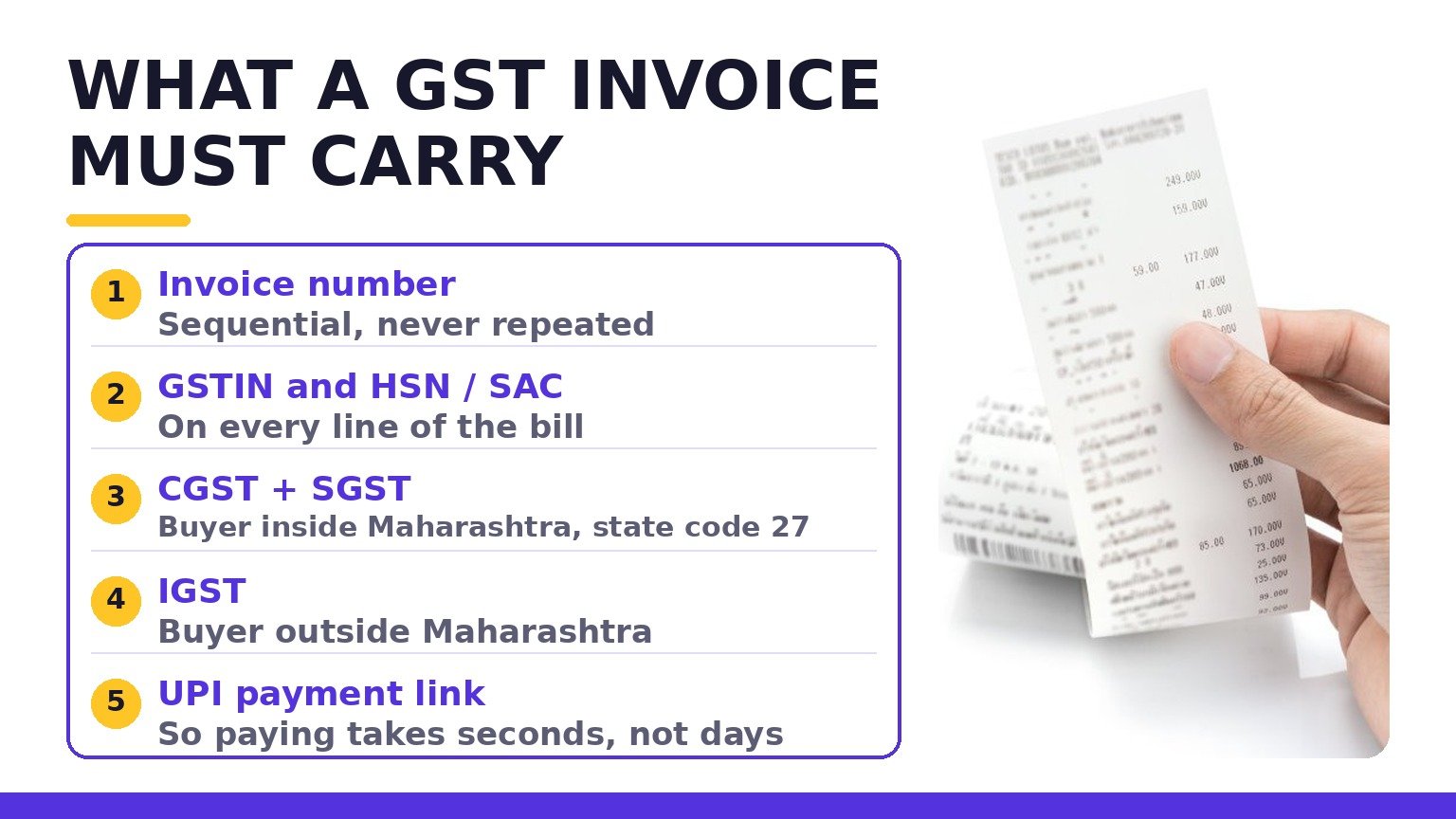
Every tax invoice needs a sequential invoice number, with no gaps and no repeats in a financial year. It needs your GSTIN and your customer’s GSTIN if the buyer is registered, the date, both business names and addresses, and the place of supply, because that decides the tax split. It also needs the HSN code for goods or the SAC code for services, the quantity, the rate, the taxable value, and the tax breakup, line by line.
The tax breakup is where Mumbai businesses most often slip. If the buyer is in Maharashtra, which is GST state code 27, the tax splits into CGST and SGST. If the buyer is outside Maharashtra, the same sale charges IGST instead. A customer in Thane or Pune gets CGST plus SGST. A customer in Surat or Delhi gets IGST. Your software must pick the right split from the customer’s state code on its own. If you have to remember it yourself, you will get it wrong on a busy day. It should also warn you before saving a bill with a missing HSN, a missing GSTIN, or a duplicate invoice number. Those three errors cause most of the rework at month end.
Billing software in Mumbai: cloud or desktop?
This is the first real decision, and it comes down to how your shop actually works, not which one sounds modern.
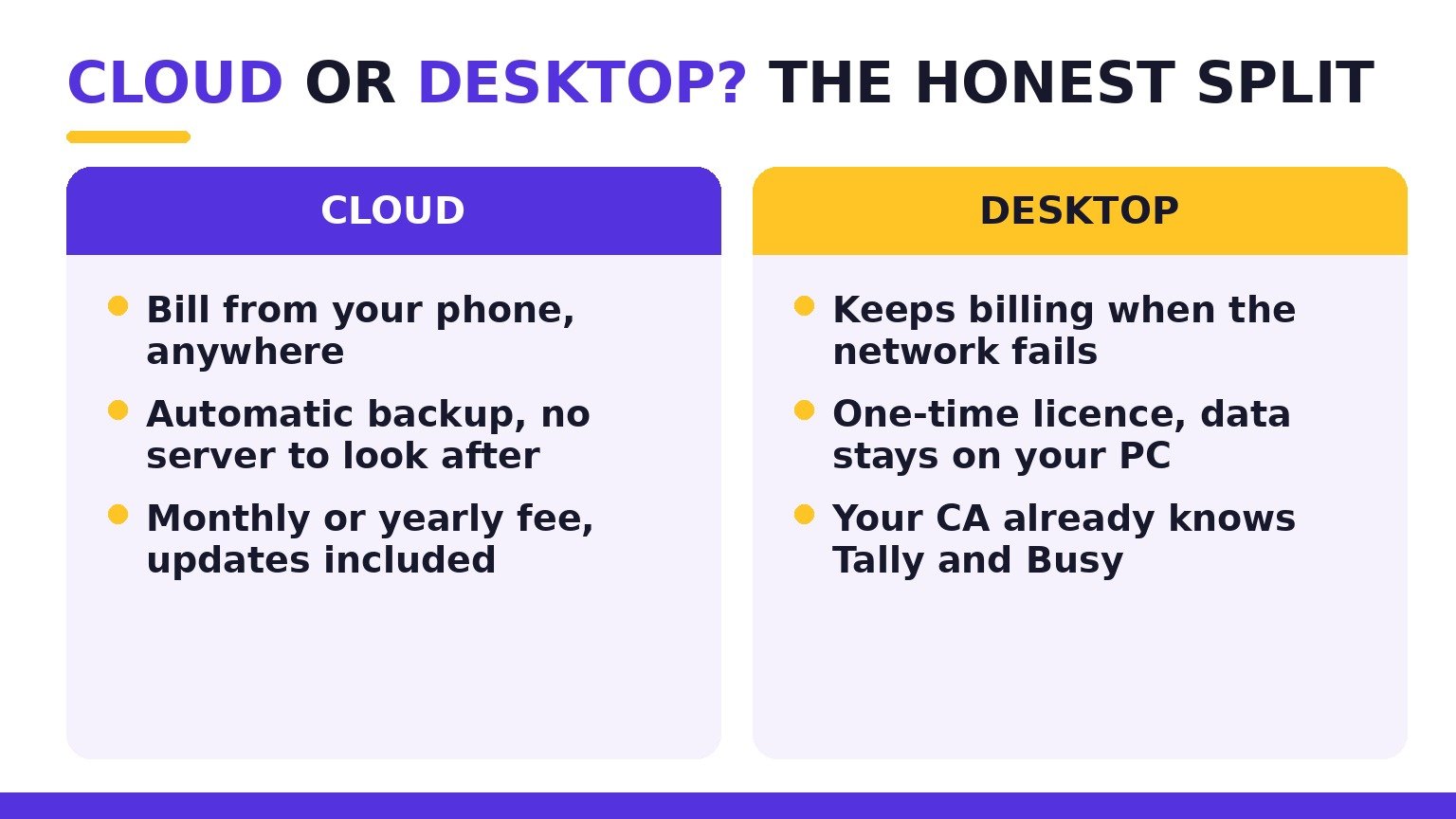
Cloud billing software runs in a browser or an app, with your data on the vendor’s servers. You can bill from the shop, check sales from home, and give your CA access without sending files. The catch is the internet: if the connection drops, some cloud tools stop until it returns.
Desktop billing software, like Tally Prime, Busy, Marg ERP or Logic ERP, runs on your own computer and keeps billing with no internet at all. That matters in Mumbai: on a heavy-rain day in July, when the broadband in your lane fails, a desktop counter keeps printing bills while a cloud-only counter waits. Several cloud tools now offer an offline mode that stores bills and syncs them when the connection returns, so test it before paying: switch off the Wi-Fi, raise a bill, print it, and switch it back on. If the bill is lost or duplicated, the tool fails the most Mumbai test there is.
Barcode, POS and stock for retail
For a retail shop, billing software is three tools in one: a fast counter screen, a barcode scanner, and a stock register that moves with every bill. A scan should pull the item, price and tax rate in one second, and the bill should print before the customer puts their wallet away.
Stock is where most shops quietly lose money. Every bill should reduce stock automatically, and every purchase should add to it. When the screen says 12 pieces left and the shelf says 4, something is wrong: usually bills raised without stock, or stock received without an entry. A good tool flags the mismatch in a daily report, so check thermal printer support, MRP and discounts per item, size and colour variants, and batch and expiry tracking before you buy.
Getting paid faster: UPI payment links and overdue reminders
Raising a bill is only half the job. The other half is getting the money.
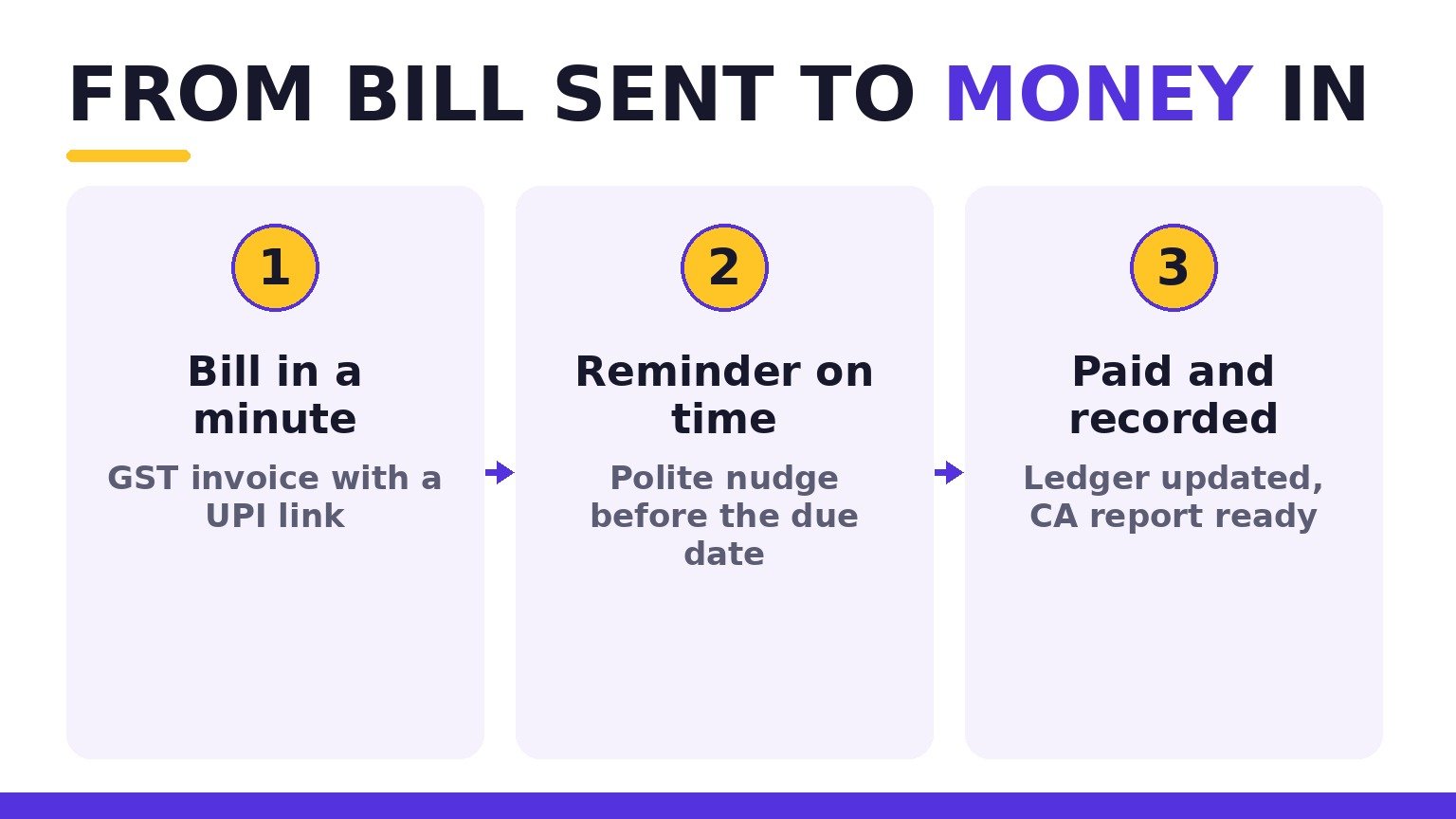
The simplest fix is a UPI payment link on the bill itself: when the invoice goes to the customer on WhatsApp or email, it should carry a link or QR code that opens their UPI app with the amount already filled in, so paying takes seconds.
The second fix is reminders that go out on their own: a polite one a day before the due date, another on the due date, and a firmer one a week later, with the bill attached. Credit, or udhaar, also needs a ledger, not a memory: the software should show you, on one screen, who owes how much and since when, and warn you before fresh credit to a customer who has not paid the last three bills.
A good CRM software for Mumbai businesses keeps payment history next to enquiries, so your team knows before they call whether this is a first delay or a pattern. And if reminders and reports still run by hand, read our guide to business automation in Mumbai.
GSTR-1 and GSTR-3B reports for your CA
Every month, your CA needs the GSTR-1, which lists your outward supplies, and the figures for GSTR-3B, the summary return where tax is paid. Good billing software prepares both from your bills: a GSTR-1 export in the portal’s format, a summary of CGST, SGST and IGST collected, input tax credit on purchases, and a list of bills missing details.
What it does not do is file the return for you. Filing stays with your business and your CA, and any vendor who says the software “files GST for you” is overselling. Ask your CA which format they want before you choose: some work with a GSTR-1 export from any tool, others want Tally.
E-invoice and e-way bill as add-ons
E-invoicing applies to businesses above a turnover threshold set by the GST rules, and the threshold has come down over the years. Cross it and your invoices must be reported to the government portal and carry an Invoice Reference Number. Most tools offer e-invoicing as an add-on, sometimes priced per invoice, so check the cost before you need it.
An e-way bill is needed when goods above a set value move from one place to another. If you dispatch goods to other states, your software should generate it from the invoice in one click. Neither feature is a reason to buy the most expensive plan on day one, but ask whether the tool can add them later, and at what price.
What breaks: the three mistakes that cost real money
Wrong HSN codes. The HSN decides the tax rate, so a wrong code means wrong tax on every bill until someone notices. Set the HSN once per item, lock the field, and review the list with your CA at setup and when you add a new product line.
Duplicate invoice numbers. Two bills with the same number will be rejected by the GST portal and will confuse your CA. It happens when two counters bill at once, or when an offline bill syncs twice. Your software must generate numbers from one sequence and warn you the moment a duplicate appears.
Stock that does not match the bills. When the software says you have stock the shelf does not, you will sell what you do not have. When the shelf has stock the software does not, you will reorder what you already own. Reconcile stock weekly, even if it is only the ten fastest-moving items.
Which billing software fits your business?
There is no single best tool, only a best fit for your kind of business.
Retail shop: Start with a cloud tool or a POS-focused desktop tool with strong barcode billing and stock. You need speed at the counter, a thermal printer, and a stock report you can read in a minute.
Wholesale trader in Crawford Market, Zaveri Bazaar or Mangaldas: You need credit ledgers, godown-wise stock, and bills that handle dozens of line items without slowing down. Desktop tools like Busy, Marg ERP or Logic ERP are built for this volume, and UPI links and overdue reminders matter here most.
Restaurant: You need table billing, a kitchen order ticket, and a tool that keeps billing when the internet drops during dinner service. Check the add-ons: e-invoice, table reservations and a waiter app are often priced separately.
Clinic: You need simple bills, receipts for patients, and a record of who paid what and when. A basic cloud billing tool is usually enough.
Service business: You need invoices that go out on WhatsApp with a UPI link, recurring bills for monthly clients, and a clear list of unpaid invoices. A basic cloud tool covers this well.
If you are unsure, pick the tool that handles your single biggest leak: unpaid invoices means buy for reminders and UPI links, stock confusion means buy for barcode and stock.
What does billing software cost in Mumbai?
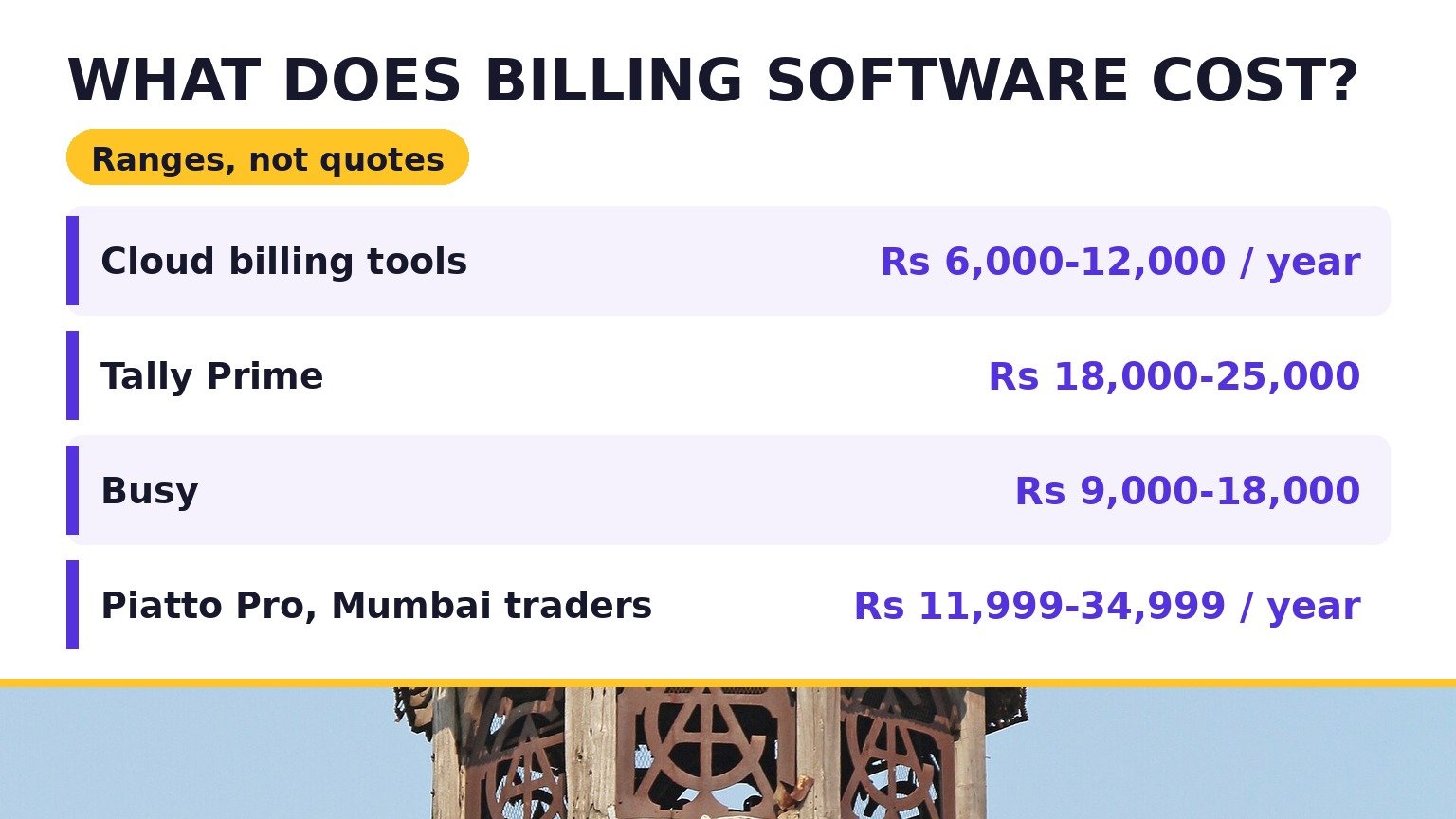
All costs below are published market ranges, not quotes. Ranges, not quotes. Your final cost depends on edition, users, and add-ons. Add 18% GST unless the vendor says the price includes it.
Run through this list before you pay. If you cannot tick at least five, fix the gap first.
GST invoice format: sequential numbers, HSN or SAC, GSTIN, and automatic CGST/SGST or IGST split by state code.
UPI payment link or QR code on every bill, sent on WhatsApp or email.
Overdue reminders that go out on their own, with the bill attached.
Stock plus barcode billing that matches the shelf.
Works offline on a heavy-rain day when the network fails.
CA-ready reports: GSTR-1 export and GSTR-3B figures.
Data export: your full customer, stock and billing history leaves with you.
Take your own items to the demo and raise a real bill in front of the vendor.
How do you know it is working?
Measure four numbers, monthly, for the first three months:
Days to get paid: the average days from invoice to payment, falling.
Unpaid invoices: the count and value of bills past their due date, both falling.
Stock match: the gap between software and shelf stock on your ten fastest-moving items, shrinking to near zero.
Billing time: minutes from order to printed bill, under a minute for a standard bill.
If money arrives faster, unpaid bills shrink, and stock matches the shelf, the software is working. If the numbers do not move in three months, check whether reminders are switched on, whether staff scan barcodes, and whether stock entries are made the same day goods arrive.
Frequently asked questions
How much does billing software cost in Mumbai?
Published market ranges start at around Rs 6,000 to 12,000 a year for a basic cloud billing tool. Tally Prime runs around Rs 18,000 to 25,000, Busy around Rs 9,000 to 18,000, Marg ERP around Rs 15,000 to 35,000, and Logic ERP with POS and barcode around Rs 20,000 to 45,000. Piatto Pro starts at around Rs 11,999 a year, TellDB from around Rs 2,400 a month for 5 users. Ranges, not quotes: 18% GST usually applies on top.
Cloud or desktop billing software, which is better for a small shop?
Cloud suits a small shop that wants sales visible from anywhere and online access for the CA. Desktop suits a shop that cannot afford to stop billing when the internet fails, and a business whose CA already works in Tally. If your lane loses connectivity in heavy rain, test the tool with the Wi-Fi switched off first.
What must a GST invoice include?
A GST invoice must include a sequential invoice number, the date, your GSTIN and business details, the customer’s details and GSTIN if registered, the place of supply, the HSN code for goods or SAC code for services, quantity, rate, taxable value, and the tax breakup. For a buyer in Maharashtra, state code 27, the tax splits into CGST and SGST; outside Maharashtra, it charges IGST.
Tally, Busy or a cloud tool, which should I pick?
Pick Tally if your CA works in Tally and accounting matters as much as billing. Pick Busy if you are a trader or distributor who needs strong inventory and multi-branch billing. Pick a cloud tool if you are a small shop or service business that wants simple billing, UPI links and automatic reminders. Match the tool to your volume and your CA.
Does billing software file my GST returns?
No. Billing software prepares the reports your CA needs, such as the GSTR-1 export and the GSTR-3B figures, but filing stays with your business and your CA. It does not replace your CA, and any vendor who says otherwise is overselling.
How do I get customers to pay faster after billing?
Put a UPI payment link or QR code on every bill so paying takes seconds, send the bill on WhatsApp the same day, and set automatic reminders for a day before the due date, on the due date, and a week after. Keep a credit ledger, and stop fresh credit to customers with long unpaid bills.
Talk to Digital Dhatu before you buy billing software
The most expensive billing software is the one that bills beautifully and never gets you paid, or the one your counter staff stops using because it slows them down. A short conversation before you spend anything can save you both mistakes.
Digital Dhatu helps Mumbai businesses pick the right billing and automation tools, connect billing with customer records, and set up the reminders that bring money in. Our own billing product, BILLit, sits alongside that work for businesses that want billing built around how they sell.
Book a free consultation and bring your messiest billing problem, the stack of unpaid bills or the stock list that never matches the shelf. We will tell you honestly what you need, what it should cost, and what you can skip. We work from Vashi and Andheri West, across Mumbai, Navi Mumbai and Thane. Contact Digital Dhatu today, and for more enquiries alongside faster payments, read our guide to lead generation for Mumbai businesses or talk to an IT solutions partner in Mumbai.
Share:
Want results like these for your business?
Talk to our team for a free consultation, with no obligation.
Start with the free foundations: a complete Google Business Profile with real photos and correct hours, a WhatsApp catalogue of your stock, and 3 to 5…
A basic AMC covers repairs when things break, while managed IT support prevents most breaks in the first place: monitoring, patching, backup checks and a helpdesk…
Short answer: Start with the four apps that matter: Google Business Profile, Zomato, Swiggy, and Instagram. A single-outlet cafe spends around Rs 35,000 to 80,000 a…